.: مراقب اقسام البوكسات والبرامج المحمية :.

الحالة
غير متواجد
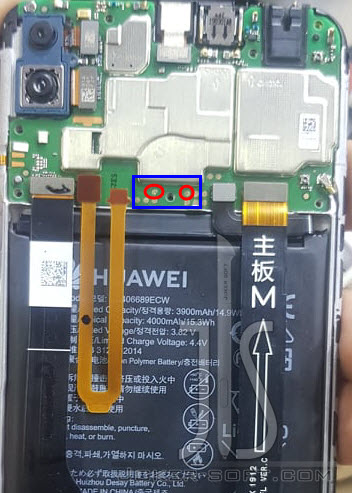
 ازالة قفل FRP لهاتف Huawei Y7 Prime 2019 DUB-LX1 بالتيست بوينت 8.2.0.192
السلام عليكم
Waiting fastboot device ...
Device found
Reading device Information...
Device Model : DUB-LX1
Device Firmware : DUB-LX1 8.2.0.192(C185)
Country : MIDDLE EAST and AFRICA
Current Status : SAFE
Image : origin
Verify Mode : enforcing
Root Info. : safe
Lock State : LOCK
Root State : UNROOT
FB Lock : LOCK
FRP Unlock : LOCK
Device tampered : False
Device unlocked : False
Device critical unlocked : False
Charger screen enabled : False
كود:
Welcome to Octoplus Huawei Software v.1.2.7
To enable 'Manufacture' mode dial
- for Qualcomm and Hisilicon based models: *#*#2846579#*#*
ProjectMenu > Background Settings > USB Port Settings > Manufacture Mode
- for MTK based models: *#*#14789632#*#*
ProjectMenu > Background Settings > USB Port Settings > Debug Mode
To enable 'Fastboot' mode
1. Power off the phone. Remove SD and SIM cards
2. Press 'Vol-' and insert USB cable
3. Wait until phone enters 'Fastboot' mode
To enable 'Upgrade' mode
1. Power off the phone. Remove SD and SIM cards
2. Press and hold 'Vol-' and 'Vol+' keys and insert USB cable
3. Wait until phone enters 'Upgrade mode'
Found COM ports:
1: COM1 Communications Port
2: COM6 USB Serial Port
3: COM7 HUAWEI USB COM 1.0
Job ID: 000000000205F68D
2021-12-25 10:15:32 GMT -------------------------------------------------
Starting Reset FRP
Selected phone model: DUB-LX1
Warning: oem get-build-number failed
Initializing remote service connection...
Connecting to phone..
Please, reconnect battery, connect USB cable with attached Test Point on your phone!
Sending loader Qualcomm Snapdragon 450V.0.mbn...
Loader send successfully
Reconnecting, please wait..
Removing FRP lock...
Reset FRP done.
Performed by 1.2.7 Software version.
اعتذاري واسفي الشديد عن نشر الادوات فك القفل المجانيه لذا تم الحذف من القناة



.gif)


المفضلات