


ومازالت المشاكل مع الهيدرا ارجو الدخول oppo a15


 ومازالت المشاكل مع الهيدرا ارجو الدخول oppo a15
ومازالت المشاكل مع الهيدرا ارجو الدخول oppo a15
.gif)

اخي الكريم راجع تعاريف الاوبو
واذكر ربك اذا نسيت
 حسين كساب واكد شَكر
تم الحل باتباع الطريقه دية
- installed in your Computer or Laptop)
- Install Qcom Mtk Driver Setup
- Install Libusb win32 devel filter (also work in Windows 64bit)
- Reboot Computer
- Open install-filter-win from the (C:\Program Files\LibUSB-Win32\bin) Path
- Select Install a Device Filter then Click on Next
- Now Stay on Device Selection
- Connect Phone With Computer Using Press and Hold Volume Up + Volume Down button and Insert USB Cable to Phone
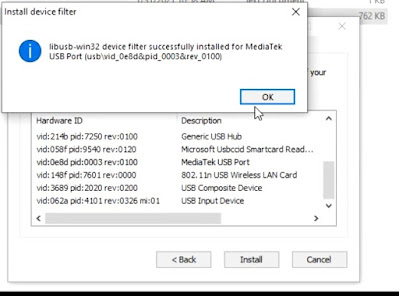
- Now You can See MediaTek USB Port in Device Manager & Libusb win32 filter installer (Check Below Image)
- Now Select MediaTek USB Port (Libusb win32 filter installer) and Click on Install
- After that You can see Successfully installed for MediaTek USB Port and Phone Automatically Disconnected
- Now Open Bypass Folder and Double Click on brom.bat file (Message Comes like Waiting for bootrom)
- Press and hold Volume Up + Volume Down button and Insert USB Cable to Android Phone Wait until Protection disabled
 hamada yousri مُعجَبون
.gif)


مبروك حل المشكلة كلها بتبقى مشكلة تعريفات
GEM-FLASH.com First Arabic Support For All Arabic Mobiles FLASH Files
سبورت الجيم فلاش Home Page | GEM-FLASH Firmware
منتدي الجيم فلاش منتدى الجيم فلاش
متجر الجيم فلاش GEM-FLASH Store ظ…طھط¬ط± ط§ظ„ط¬ظٹظ… ظپظ„ط§ط´
سيرفر الجيم فلاش GEM-FLASH Server
مركز رفع الصور Welcome to GEM-FLASH.COM Multi Uploader, a free image upload solution. Simply browse, select, and upload!




المفضلات