.: مراقب اقسام البوكسات والبرامج المحمية :.

الحالة
غير متواجد
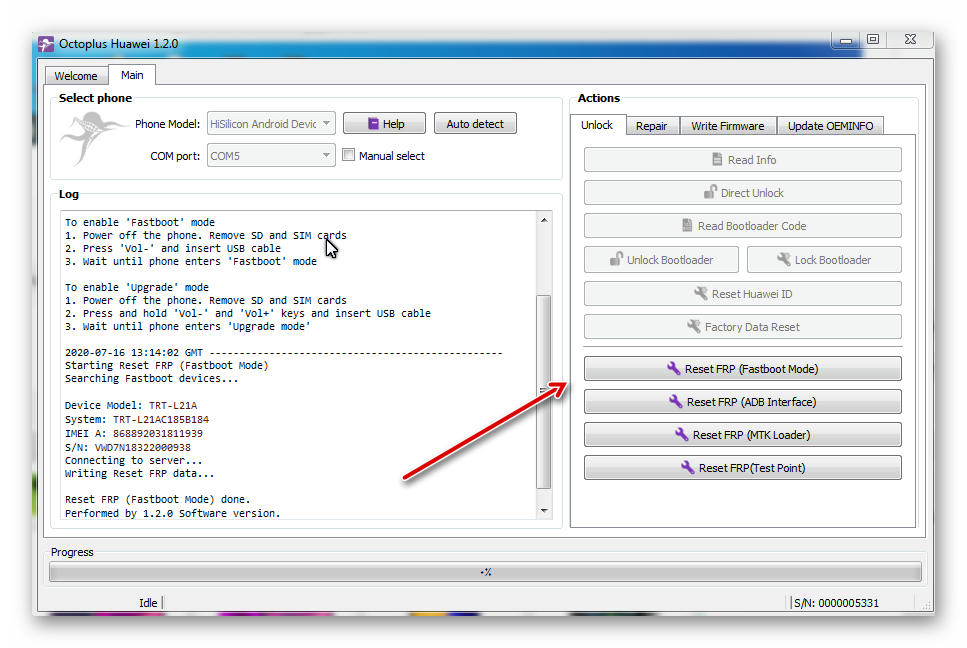
 ازالة قفل FRP لهاتف Huawei Y7 Prime TRT-L21A
Welcome to Octoplus Huawei Software v.1.2.0
To enable 'Manufacture' mode dial
- for Qualcomm and Hisilicon based models: *#*#2846579#*#*
ProjectMenu > Background Settings > USB Port Settings > Manufacture Mode
- for MTK based models: *#*#14789632#*#*
ProjectMenu > Background Settings > USB Port Settings > Debug Mode
To enable 'Fastboot' mode
1. Power off the phone. Remove SD and SIM cards
2. Press 'Vol-' and insert USB cable
3. Wait until phone enters 'Fastboot' mode
To enable 'Upgrade' mode
1. Power off the phone. Remove SD and SIM cards
2. Press and hold 'Vol-' and 'Vol+' keys and insert USB cable
3. Wait until phone enters 'Upgrade mode'
2020-07-16 13:14:02 GMT -------------------------------------------------
Starting Reset FRP (Fastboot Mode)
Searching Fastboot devices...
Device Model: TRT-L21A
System: TRT-L21AC185B184
IMEI A: 868892031811939
S/N: VWD7N18322000938
Connecting to server...
Writing Reset FRP data...
Reset FRP (Fastboot Mode) done.
Performed by 1.2.0 Software version.
اعتذاري واسفي الشديد عن نشر الادوات فك القفل المجانيه لذا تم الحذف من القناة



.gif)


المفضلات