قائمة الاعضاء المشار اليهم

النتائج 1 إلى 5 من 5

الموضوع: How to Unlock the iPhone 3G Using UltraSn0w

العرض المتطور

المشاركة السابقة المشاركة السابقة   المشاركة التالية المشاركة التالية
  1. #1
    .: جيماوي مشارك :.
    الصورة الرمزية raseelmsm

    الحالة
    غير متواجد
    تاريخ التسجيل
    Aug 2008
    المشاركات
    56
    الشَكر (المُعطى)
    2
    الشَكر (المُستلَم)
    75
    الإعجاب (المُعطى)
    0
    الإعجاب (المُستلَم)
    0
    غير معجبون (المُعطى)
    0
    غير معجبون (المُستلَم)
    0
    تم تذكيره فى
    0 مشاركة
    تمت الاشارة اليه فى
    0 مواضيع
    معدل تقييم المستوى
    37

    افتراضي

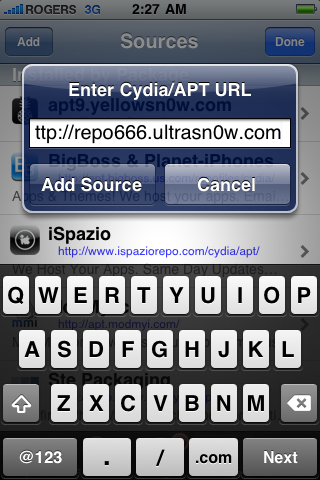
    Step Six
    Enter http://repo666.ultrasn0w.com/as the source url and press the Add Source button.


    How to Unlock the iPhone 3G Using UltraSn0w

    Step Seven
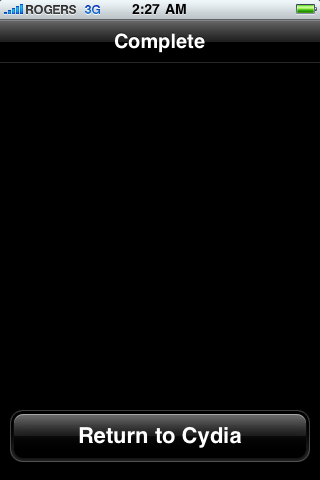
    Once the source has been added press the large Return to Cydia button.

    How to Unlock the iPhone 3G Using UltraSn0w

    Step Eight
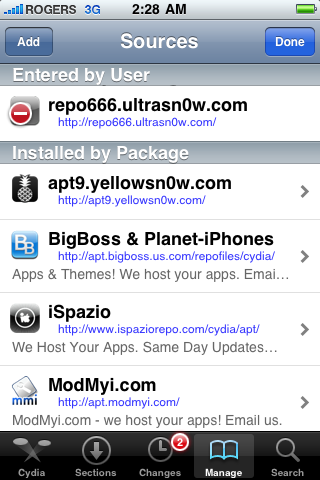
    Press the Done button at the top right of the screen.

    How to Unlock the iPhone 3G Using UltraSn0w

    Step Nine
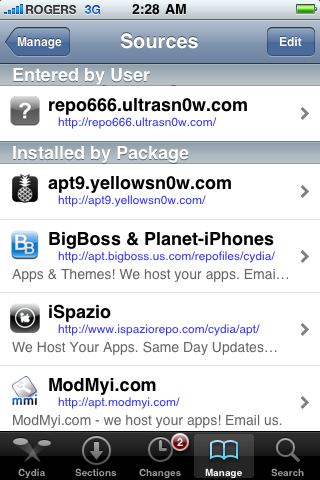
    Press to select repo666.ultrasn0w.com from the list of user entered sources.
    How to Unlock the iPhone 3G Using UltraSn0w


  2. الشَكر djesam13, ana_ye شَكر
  3. #2
    .: جيماوي مشارك :.
    الصورة الرمزية raseelmsm

    الحالة
    غير متواجد
    تاريخ التسجيل
    Aug 2008
    المشاركات
    56
    الشَكر (المُعطى)
    2
    الشَكر (المُستلَم)
    75
    الإعجاب (المُعطى)
    0
    الإعجاب (المُستلَم)
    0
    غير معجبون (المُعطى)
    0
    غير معجبون (المُستلَم)
    0
    تم تذكيره فى
    0 مشاركة
    تمت الاشارة اليه فى
    0 مواضيع
    معدل تقييم المستوى
    37

    افتراضي

    Step Ten
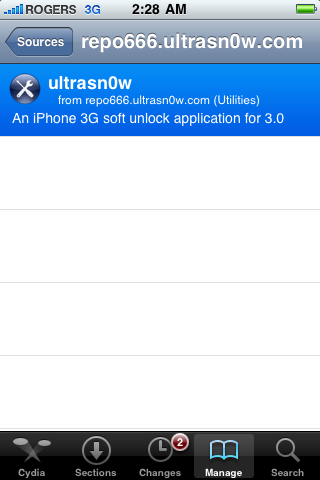
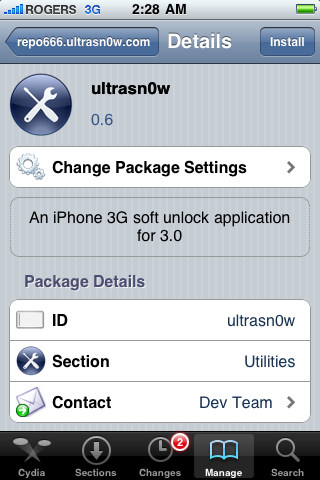
    Press to select ultrasn0w from the list of packages

    How to Unlock the iPhone 3G Using UltraSn0w

    Step Eleven
    Press the Install button at the top right of the screen.

    How to Unlock the iPhone 3G Using UltraSn0w

    Step Twelve
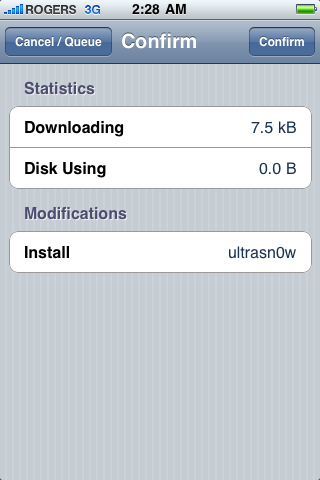
    Press the Confirm button at the top right of the screen.

    How to Unlock the iPhone 3G Using UltraSn0w

  4. الشَكر ana_ye شَكر
  5. #3
    .: جيماوي مشارك :.
    الصورة الرمزية raseelmsm

    الحالة
    غير متواجد
    تاريخ التسجيل
    Aug 2008
    المشاركات
    56
    الشَكر (المُعطى)
    2
    الشَكر (المُستلَم)
    75
    الإعجاب (المُعطى)
    0
    الإعجاب (المُستلَم)
    0
    غير معجبون (المُعطى)
    0
    غير معجبون (المُستلَم)
    0
    تم تذكيره فى
    0 مشاركة
    تمت الاشارة اليه فى
    0 مواضيع
    معدل تقييم المستوى
    37

    افتراضي

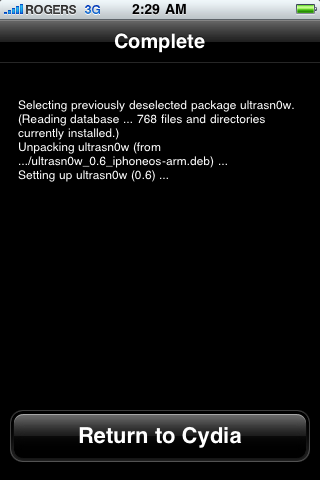
    Step Thir****
    After installation completes successfully press the large Return to Cydia button.

    How to Unlock the iPhone 3G Using UltraSn0w

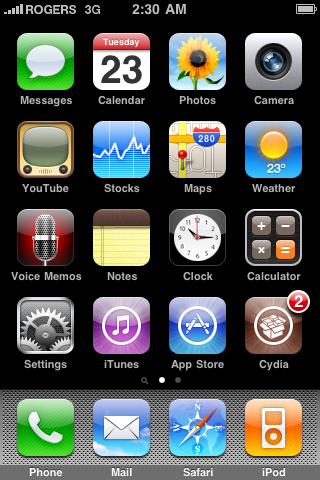
    Step Four****
    Now press the Home button then power off and power on the iPhone. You do this by holding down the power button for 3 seconds then moving the power slider that appears to the right. Press the power button again to turn on the phone.

    How to Unlock the iPhone 3G Using UltraSn0w
    Step Fif****
    You should now be able to insert the SIM of your choice!

    How to Unlock the iPhone 3G Using UltraSn0w

    masha ALLAH enjoy

  6. الشَكر gamal, ana_ye شَكر

الكلمات الدلالية لهذا الموضوع

المفضلات

المفضلات

ضوابط المشاركة

  • لا تستطيع إضافة مواضيع جديدة
  • لا تستطيع الرد على المواضيع
  • لا تستطيع إرفاق ملفات
  • لا تستطيع تعديل مشاركاتك
  •