قائمة الاعضاء المشار اليهم

النتائج 1 إلى 2 من 2

الموضوع: Samsung Full Firmware Download Procedure Using Samfirm

مشاهدة المواضيع

المشاركة السابقة المشاركة السابقة   المشاركة التالية المشاركة التالية
  1. #1
    .: جيماوي جديد :.
    الصورة الرمزية ...::Arif::...

    الحالة
    غير متواجد
    تاريخ التسجيل
    Jul 2016
    المشاركات
    8
    الشَكر (المُعطى)
    4
    الشَكر (المُستلَم)
    11
    الإعجاب (المُعطى)
    0
    الإعجاب (المُستلَم)
    0
    غير معجبون (المُعطى)
    0
    غير معجبون (المُستلَم)
    0
    تم تذكيره فى
    0 مشاركة
    تمت الاشارة اليه فى
    0 مواضيع
    معدل تقييم المستوى
    0

    Post Samsung Full Firmware Download Procedure Using Samfirm

    Samsung Full Firmware Download Procedure Using Samfirm

    Here is the Procedure to Download the Samsung latest Full Firmware's (Please understand that this tool can only download latest firmware)

    Download
    SamFirm_v0.3.6.zip

    Steps
    1:Type model number in Model Tab EX: SM-N910G
    2:Type which Region firmware you Need Ex:INU/INS. Click Here to Region list
    .To Know your mobile Region
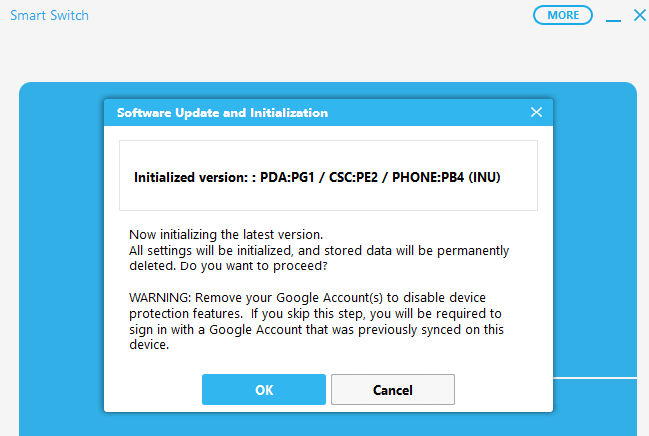
    2.1: Download Smart switch in you Pc
    2.3:Select Emergency Software Recovery And Initialization
    2.4:Go to Device Initialization
    2.5:Type your model number Ex- SM-N910G and search
    2.6:Enter the Serial Number of your Device
    2.7:There you can see your Device Region

    xiAV2dG
    4:Check Binary Nature
    5:Check Update
    6:Check Crc32 and Decrypt automatically box
    7:Click Download and save the file
    Samsung Full Firmware Download Procedure Using Samfirm
    8:After Download Extract via 7zip.(Winrar gives error)
    Done Enjoy


    التعديل الأخير تم بواسطة ...::Arif::... ; 23-07-2016 الساعة 10:08 AM سبب آخر: Add Link

  2. الشَكر rabiegsm, younes1 شَكر

الكلمات الدلالية لهذا الموضوع

المفضلات

المفضلات

ضوابط المشاركة

  • لا تستطيع إضافة مواضيع جديدة
  • لا تستطيع الرد على المواضيع
  • لا تستطيع إرفاق ملفات
  • لا تستطيع تعديل مشاركاتك
  •