
قائمة الاعضاء المشار اليهم

النتائج 1 إلى 2 من 2

الموضوع: ممكن فلاشة مناسبة one s

  1. #1
    .: جيماوي رائع :.
    الصورة الرمزية أبو جراح

    الحالة
    غير متواجد
    تاريخ التسجيل
    Feb 2011
    الدولة
    سوريا
    Phone
    Note 5
    المشاركات
    567
    الشَكر (المُعطى)
    11
    الشَكر (المُستلَم)
    482
    الإعجاب (المُعطى)
    0
    الإعجاب (المُستلَم)
    11
    غير معجبون (المُعطى)
    0
    غير معجبون (المُستلَم)
    0
    تم تذكيره فى
    0 مشاركة
    تمت الاشارة اليه فى
    0 مواضيع
    معدل تقييم المستوى
    53

    افتراضي ممكن فلاشة مناسبة one s

    ممكن فلاشة مناسبة one s

    كود HTML:
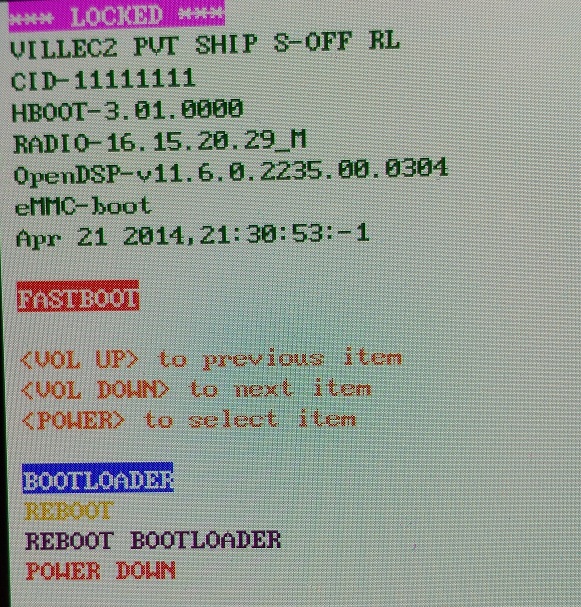
    (bootloader) version: 0.5
    (bootloader) version-bootloader: 3.01.0000
    (bootloader) version-baseband: 16.15.20.29_M
    (bootloader) version-cpld: None
    (bootloader) version-microp: None
    (bootloader) version-main: 3.19.401.103
    (bootloader) version-misc: PVT SHIP S-OFF
    (bootloader) serialno: HT26MW402327
    (bootloader) imei: **************
    (bootloader) meid:
    (bootloader) product: villec2
    (bootloader) platform: HBOOT-8260
    (bootloader) modelid: PJ402****
    (bootloader) cidnum: 11111111
    (bootloader) battery-status: good
    (bootloader) battery-voltage: 3706mV
    (bootloader) partition-layout: Generic
    (bootloader) security: off
    (bootloader) build-mode: SHIP
    (bootloader) boot-mode: FASTBOOT
    (bootloader) commitno-bootloader: 9006d003
    (bootloader) hbootpreupdate: 11
    (bootloader) gencheckpt: 0
    all: Done!
    finished. total time: 0.492s
    ممكن فلاشة مناسبة one s

    بعد تحليلي للمعلومات تبين لي انه يجب ان تكون هذه هي الفلاشة المناسبة
    كود HTML:
    RUU_Villec2_11111111_3.19.401.103_Radio_16.15.20.29_m
    صح ام خطأ
    ممكن رابط فلاشة مناسبة جزاكم الله كل خير


  2. تاريخ التسجيل
    Always
    الدولة
    Advertising world
    المشاركات
    Many
  3. #2
    .: جيماوي رائع :.
    الصورة الرمزية أبو جراح

    الحالة
    غير متواجد
    تاريخ التسجيل
    Feb 2011
    الدولة
    سوريا
    Phone
    Note 5
    المشاركات
    567
    الشَكر (المُعطى)
    11
    الشَكر (المُستلَم)
    482
    الإعجاب (المُعطى)
    0
    الإعجاب (المُستلَم)
    11
    غير معجبون (المُعطى)
    0
    غير معجبون (المُستلَم)
    0
    تم تذكيره فى
    0 مشاركة
    تمت الاشارة اليه فى
    0 مواضيع
    معدل تقييم المستوى
    53

    افتراضي

    تم التفبش بتجاح

    RUU_VILLEC2_U_ICS_40_HTC_Europe_1.11.401.101_Radio_16.12.20.02U_16.05.20.16_M2_release_261661_signed

    كود HTML:
    Scanning devices ... 1 found
    dev[1]  HT26MW402327
      Mode:           normal
      Hardware:       villec2
      Manufactory:    HTC
      MID:            PJ402****
    Detect 1 USB devices not install driver
    
    Checking environment ... 
    System Info
      Display ID:     JRO03C
      System Ver:     4.1.1 REL
      API Level:      16
      Incremental:    157254.103
      Model:          HTC One S
      Brand:          htc
      Device:         villec2
      Platform:       msm8660
      Product:        villec2
      Language:       en
      Rigion:         US
    
    SDCard Info
      SDCARD[1] KYL00M 
      > CID:          1501004b594c30304d20702e0b8caee6
      > CSD:          d02701320f5903fff6dbffef8a404066
      > Type:         MMC
      > Serial:       0x702e0b8c
      > Parts:        35
      > Part[17]:     /vendor/firmware/misc
      > Part[19]:     /vendor/firmware/adsp
      > Part[25]:     /devlog
      > Part[32]:     /system
      > Part[33]:     /cache
      > Part[34]:     /data
    
    Device Info
      Serial number:  HT26MW402327
      Model ID:       PJ402****
      CID:            11111111
      Carrier ID:     ALL (11111111)
      Hardware:       villec2
      Bootmode:       normal
      Bootloader ver: 3.01.0000
      Revision:       0
      Main version:   3.19.401.103
      Baseband ver:   16.15.20.29_M
      GSM baseband:   
      GSM sim state:  
      Get Bluetooth info failed
      Get WI-FI info failed
      Root Access:    No root
    
    Get device information done , time used 3.87s
    Time used : 3.9 s
    
    
    Reboot device to FASTBOOT mode ... 
    Re-scan device before any operation please
    
    Load "F:\RUU_VILLEC2_U_ICS_40_HTC_Europe_1.11.401.101_Radio_16.12.20.02U_16.05.20.16_M2_release_261661_signed.zip" ok
    Parsing ZIP Format
    File Info:
      File contain signature data
      main ver  : 1.11.401.101
      model id  : PJ4020000
      custom id : HTC__001 ( HTC-WWE )
                  HTC__E11 ( HTC-Dutch )
                  HTC__203 ( HTC-FRA )
                  HTC__102 ( HTC-GER )
                  HTC__405 ( HTC-ITA )
                  HTC__Y13 ( HTC-Nor )
                  HTC__304 ( HTC-SPA )
                  HTC__M27 ( HTC-Turkey )
                  HTC__A07 ( HTC-Russia )
                  HTC__A48 (  )
                  HTC__032 ( HTC-EastEurope )
                  HTC__J15 ( HTC-GCC )
                  HTC__016 ( VODA-Africa-South )
    Hboot Info:
      hboot contain signature data
      size      : 1023.3 KB
      version   : 2.09.0001
      name      : 8260 SPL
      type      : SHIP
      platform  : HBOOT-8260
      commitno  : f616909f
    
    Prepare to flashing ... Scan device first
    
    Restarting ADB service ... ok
    
    Scanning devices ... 1 found
    dev[1]  HT26MW402327
      Mode:           fastboot
      Hardware:       villec2
      Manufactory:    HTC
      MID:            PJ402****
    
    Prepare to flashing ... ok
    Reboot device to RUU mode ... 
    Wait device ready ... 
    Check battery status ... ok
    Erasing cache ... ok
    Erasing userdata ... ok
    Checking bootloader ... support unlock
    Device security status is S-OFF
    Sending data ... 
    device: start check_usb: usb_ep0: type=128, request=6
    
    device: zip header checking...
    device: shift signature_size for header checking...
    device: zip info parsing...
    device: checking model ID...
    device: checking custom ID...
    unzipping and checking hboot ...
    write partition hboot
    device: ...... Successful
    unzipping and checking sbl1 ...
    write partition sbl1
    device: signature checking...
    device: ...... Successful
    unzipping and checking sbl2 ...
    write partition sbl2
    device: ...... Successful
    unzipping and checking sbl3 ...
    write partition sbl3
    device: ...... Successful
    unzipping and checking rpm ...
    write partition rpm
    device: ...... Successful
    unzipping and checking tz ...
    write partition tz
    device: ...... Successful
    hboot pre-update ok
    Reboot device to RUU mode ... 
    Wait device ready ... 
    Device security status is S-OFF
    Sending data ... 
    device: start check_usb: usb_ep0: type=128, request=6
    
    device: zip header checking...
    device: shift signature_size for header checking...
    device: zip info parsing...
    device: checking model ID...
    device: checking custom ID...
    write partition boot
    write partition recovery
    write partition system
    write partition sp1
    write partition dzdata
    write partition adsp
    write partition pg2fs_spcustom
    write partition cs
    write partition radio
    write partition rcdata
    Flash completed, time used 527.2s
    
    Reboot device to NORMAL mode ... 
    Re-scan device before any operation please

الكلمات الدلالية لهذا الموضوع

المفضلات

المفضلات

ضوابط المشاركة

  • لا تستطيع إضافة مواضيع جديدة
  • لا تستطيع الرد على المواضيع
  • لا تستطيع إرفاق ملفات
  • لا تستطيع تعديل مشاركاتك
  •
