


 طريقه تفليش و فلاشات lg ke970 + ke770
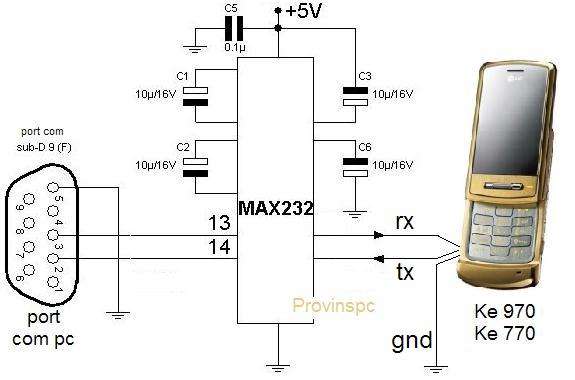
This tutorial aims to revive a KE970 shine that will not turn on completely (reboot on logo). The flasher also supports ke 770. The cable used is the original USB cable (same as the KU990) and based interface max232. The rx, tx and the mass of the gsm usb cable is connected to max232. This max 232 com port connected to the pc. >> Explanations and diagrams max 232 here <<This manip uses a max232 as the mobile does not turn completely, no usb driver is installed.
1: Detail of cable:
The original usb cable is simply connected to the max232 and assembly connected to the pc com port. All editing of the same type or box Unlock ensuring liasion between the PC and mobile will and the flasher can work with any COM port, even virtual. Just then locate the manager péripérique com port of the box ..
2: Flash Mobile:
Connect your mobile phone with a battery extinguished.
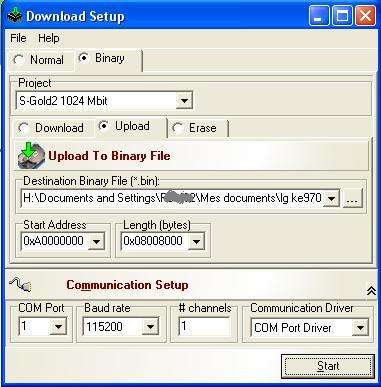
Select the Download tab. Go find your firmware in the "Destination binary ...."
Select the COM port (1 or 2 if cable based max232)
Click "Start"
Press for 2 seconds the power button of gsm.
The flash begins .....
If that does not progress and indicates an error, repeat the procedure with boot power.
Once the flash completed successfully, the progress bar turns green and displays the soft success. Flash last longer than 90 minutes! This is normal since the com port speed is 115200 baud.
Flashing is complete.
3: Download the software and firmware:
Software for Flash: Flash tool E2 HERE
KE970 firmwares here: Firmware HERE V10A
Firmware ke770 here
منقول من
http://forum.gsmhosting.com/vbb/showthread.php?t=782979




 رد مع اقتباس



المفضلات