

تفضل من هناالمشاركة الأصلية كتبت بواسطة h5ha

هذه عربي HTC_Desire_600_CUSTOM_DEODEX_1.20.401.1_v.1.4.121


 رد: لمعرف ما هو الروم المناسب لهاتفك HTC
تفضل من هنا
هذه عربي HTC_Desire_600_CUSTOM_DEODEX_1.20.401.1_v.1.4.121
 sajjad ali شَكر
رد: لمعرف ما هو الروم المناسب لهاتفك HTC
sajjad ali شَكر
رد: لمعرف ما هو الروم المناسب لهاتفك HTC
انا كان الامر صعب عليك فهناك طرق اسهل للحصول على اللغه العربية جهاز من خلال برنامج morelocale 2
هنا الشرح البسيط . .بالصور ..
HOW TO UNLOCK DEVELOPER MODE TO SET MULTIPLE LANGUAGES ON ANDROID OS 4.2.2
I was trying to set my new Samsung Tab 3 from English to other languages (Nepali, Hindi, Chinese Hongkong). Such languages were not listed in default Samsung’s “Language and Input” setting, then I face a big problem. I search for other third party application to set other languages in my Tab.
Morelocale 2 (Click here to download) is the best apps for it but I found that it does not have permission to choice or set up other languages for android 4.2.2 system. You have to have permission to set up that.
Problem:
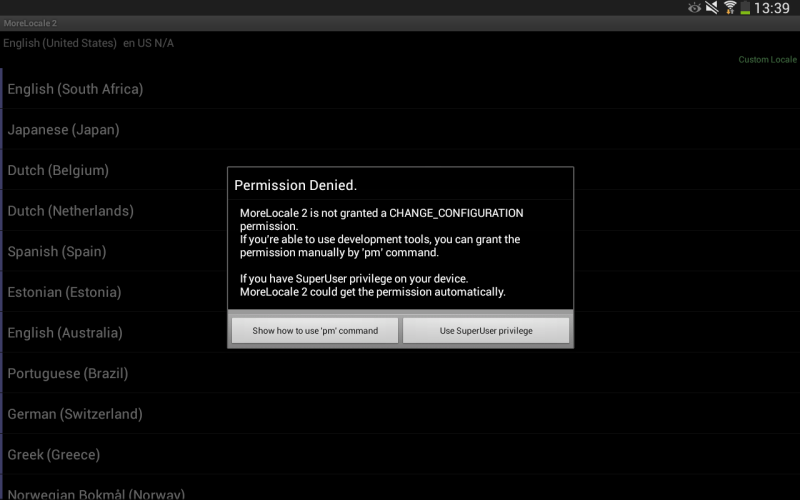
Permission denied.
MoreLocale 2 is not granted a CHANGE_CONFIGURATION permission.
Solution:
You need to do some tweak on your Android OS 4.2.2.
1. Download Android SDK from developer.android.com (Click here to download). Unzip it and install Android SDK Manager.
2. Now you need to unlock the Developer Option on your Android OS. To unlock:
- Go to Settings – > About Device and Tap 7 times continuously on Build number.
Quite funny, but it will help you to unlock the Developer option. You will get the new tab named as “Developer Option” above “About Device“.
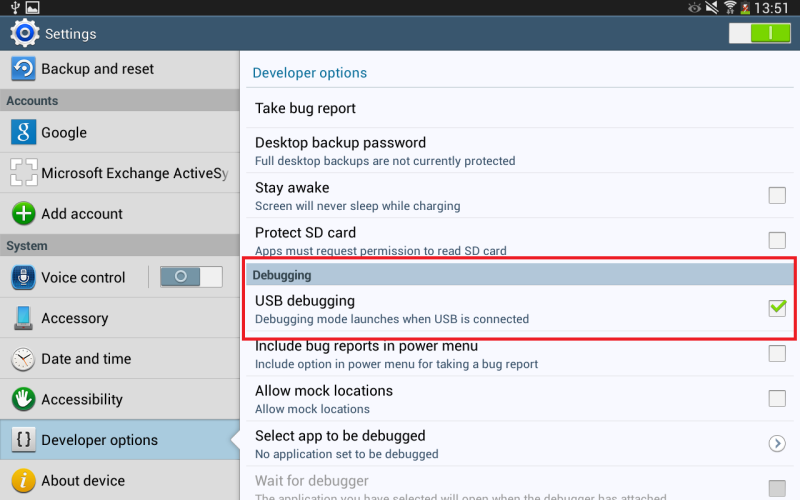
3. Enable USB Debugging from Developer Option by Checking on it.
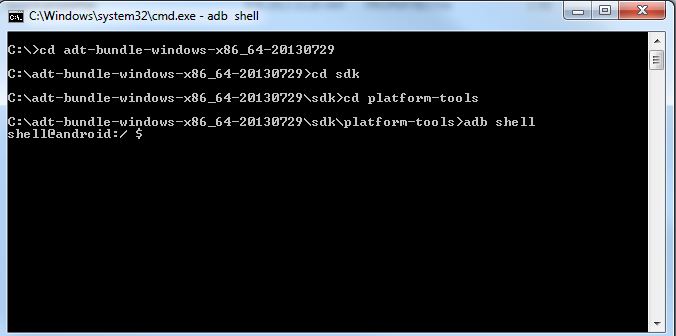
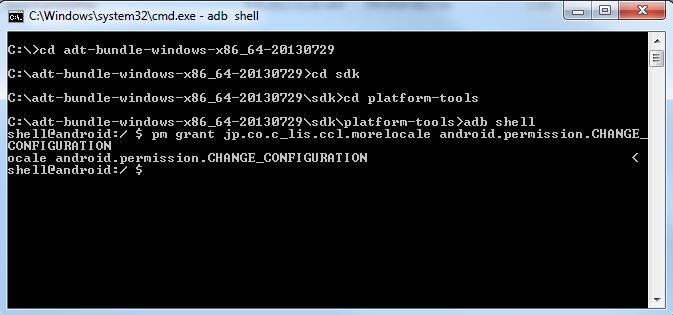
4. Now its time to take help of Andorid SDK that has been installed a while ago. Open command prompt on your PC on admin mode and connect your Tab or Galaxy S4 or any Android device 4.2.2 via USB to your PC. Then Type the following command from the right folder path ******** as shown in picture below :
- adb ****l
- pm grant jp.co.c_lis.ccl.morelocale android.permission.CHANGE_CONFIGURATION
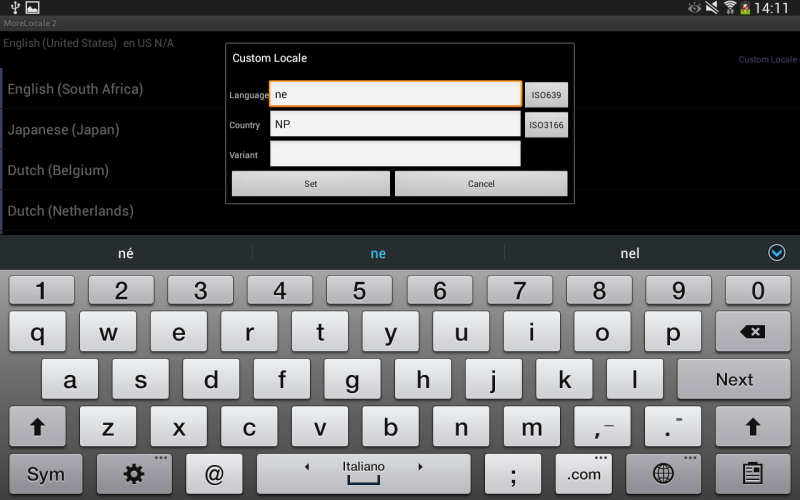
5. Now you are almost done with this Android permission to change your desired language on 4.2.2. Open the appsMore Locale 2, choose your language by pressing ISO639 and Set on your device.
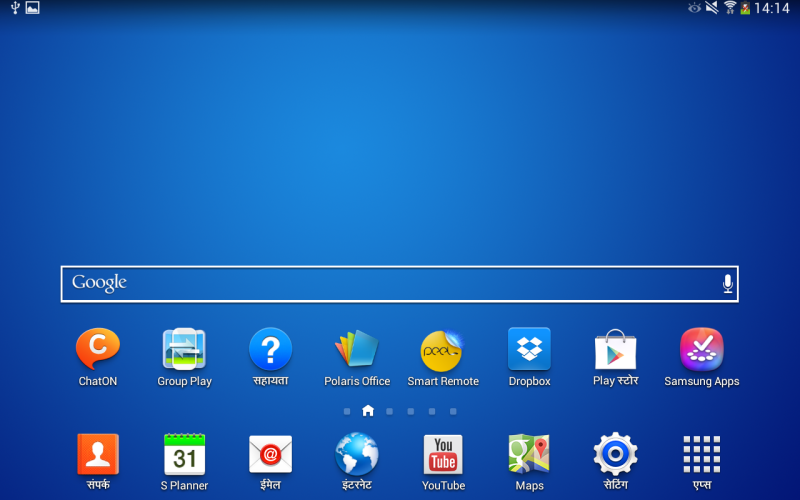
Final look will be like this:
Hope you like this solution.

 رد: لمعرف ما هو الروم المناسب لهاتفك HTC
جهاز htc 816
INFOversion: 0.5
INFOversion-bootloader: 3.19.0.0000
INFOversion-baseband: 1.13.3230.16.05
INFOversion-cpld: None
INFOversion-microp: None
INFOversion-main:
INFOversion-misc: PVT SHIP S-OFF
INFOserialno: HC47GWW02211
INFOimei: 352246067190457
INFOimei2: 352246067190465
INFOmeid: 00000000000000
INFOproduct: a5_dug
INFOplatform: hTCBmsm8226
INFOmodelid: 0P9C70000
INFOcidnum: 11111111
INFObattery-status: good
INFObattery-voltage: 0mV
INFOpartition-layout: Generic
INFOsecurity: off
INFObuild-mode: SHIP
INFOboot-mode: FASTBOOT
INFOcommitno-bootloader: 5534924e
INFOhbootpreupdate: 11
INFOgencheckpt: 0
all: Done!
sajjad ali شَكر

 رد: لمعرف ما هو الروم المناسب لهاتفك HTC
لا يوجد له اى فلاشات غير بالوكلات و سابورت ir-key فقط
sajjad ali شَكر
.gif)
 رد: لمعرف ما هو الروم المناسب لهاتفك HTC
محتاجه ضرورى جداc:\Fastboot+ADB>fastboot getvar all
(bootloader) version: 0.5
(bootloader) version-bootloader: 1.28.0004
(bootloader) version-baseband: 3831.15.00.20_M
(bootloader) version-cpld: None
(bootloader) version-microp: None
(bootloader) version-main:
(bootloader) serialno: HT24WVZ03370
(bootloader) imei: 358317047902339
(bootloader) product: runnymede
(bootloader) platform: HBOOT-7230
(bootloader) modelid: PI3921000
(bootloader) cidnum: VODAP021
(bootloader) battery-status: good
(bootloader) battery-voltage: 3695mV
(bootloader) partition-layout: Generic
(bootloader) security: on
(bootloader) build-mode: SHIP
(bootloader) boot-mode: FASTBOOT
(bootloader) commitno-bootloader: 11f79cc7
(bootloader) hbootpreupdate: 12
(bootloader) gencheckpt: 0
all: Done!
finished. total time: 0.011s
c:\Fastboot+ADB>
htc senstion xl
رد: لمعرف ما هو الروم المناسب لهاتفك HTC
sajjad ali شَكر
رد: لمعرف ما هو الروم المناسب لهاتفك HTC
c:\ADBFAST>fastboot getvar all
INFOversion: 0.5
INFOversion-bootloader: 0.83.0001
INFOversion-baseband: 4.08.00.09
INFOversion-cpld: None
INFOversion-microp: 051d
INFOversion-main: 1.22.73.1
INFOserialno: SH09KPL03266
INFOimei: 353833048712639
INFOproduct: bravo
INFOplatform: HBOOT-8x50
INFOmodelid: PB9920000
INFOcidnum: ORANG202
INFObattery-status: good
INFObattery-voltage: 3986mV
INFOpartition-layout: Generic
INFOsecurity: on
INFObuild-mode: SHIP
INFOboot-mode: FASTBOOT
INFOcommitno-bootloader: dirty-8f39c3b
INFOhbootpreupdate: 11
all: Done!
finished. total time: 0.008s

 رد: لمعرف ما هو الروم المناسب لهاتفك HTC
C:\ADB>fastboot getvar all
(bootloader) version: 0.5
(bootloader) version-bootloader: 1.35.0002
(bootloader) version-baseband: 10.12.45D.06A
(bootloader) version-cpld: None
(bootloader) version-microp: None
(bootloader) version-main: 1.04.707.3
(bootloader) version-misc: PVT SHIP S-ON
(bootloader) serialno: HT396LP00075
(bootloader) imei: 353966056******
(bootloader) meid:
(bootloader) product: magnids
(bootloader) platform: HBOOT-8225
(bootloader) modelid: PM8610000
(bootloader) cidnum: HTC__044
(bootloader) battery-status: good
(bootloader) battery-voltage: 0mV
(bootloader) partition-layout: HTC
(bootloader) security: on
(bootloader) build-mode: SHIP
(bootloader) boot-mode: FASTBOOT
(bootloader) commitno-bootloader: dirty-1cf765e2
(bootloader) hbootpreupdate: 12
(bootloader) gencheckpt: 0
all: Done!
finished. total time: 0.076s
رد: لمعرف ما هو الروم المناسب لهاتفك HTC
INFOversion: 0.5
INFOversion-bootloader: 3.19.0.0000
INFOversion-baseband: 1.22.21331147A1.
INFOversion-cpld: None
INFOversion-microp: None
INFOversion-main:
INFOversion-misc: PVT SHIP S-ON
INFOserialno: FA4C4WM00180
INFOimei:
INFOimei2: Not Support
INFOmeid: 00000000000000
INFOproduct: m8_ul
INFOplatform: hTCBmsm8974
INFOmodelid: 0P6B11000
INFOcidnum: HTC__621
INFObattery-status: good
INFObattery-voltage: 0mV
INFOpartition-layout: Generic
INFOsecurity: on
INFObuild-mode: SHIP
INFOboot-mode: FASTBOOT
INFOcommitno-bootloader: df77f8b7
INFOhbootpreupdate: 11
INFOgencheckpt: 0
all: Done!
 رد: لمعرف ما هو الروم المناسب لهاتفك HTC
Microsoft Windows [Version 6.1.7601]
Copyright (c) 2009 Microsoft Corporation. All rights reserved.
C:\Program Files\Minimal ADB and Fastboot>ADBFAST
'ADBFAST' is not recognized as an internal or external command,
operable program or batch file.
C:\Program Files\Minimal ADB and Fastboot>fastboot getvar all
(bootloader) version: 0.5
(bootloader) version-bootloader: 3.19.0.0000
(bootloader) version-baseband: 1.13.3230.16.05
(bootloader) version-cpld: None
(bootloader) version-microp: None
(bootloader) version-main:
(bootloader) version-misc: PVT SHIP S-ON
(bootloader) serialno: FA4AFWW03658
(bootloader) imei: 352706065151066
(bootloader) imei2: 352706065151074
(bootloader) meid: 00000000000000
(bootloader) product: a5_dug
(bootloader) platform: hTCBmsm8226
(bootloader) modelid: 0P9C70000
(bootloader) cidnum: HTC__059
(bootloader) battery-status: good
(bootloader) battery-voltage: 0mV
(bootloader) partition-layout: Generic
(bootloader) security: on
(bootloader) build-mode: SHIP
(bootloader) boot-mode: FASTBOOT
(bootloader) commitno-bootloader: 5534924e
(bootloader) hbootpreupdate: 11
(bootloader) gencheckpt: 0
all: Done!
finished. total time: 0.044s
C:\Program Files\Minimal ADB and Fastboot>




المفضلات