

السلام عليكم
لدي جهاز e700h فاقد شبكة احيانا قليل تظهر واغلب الاحيان لاتوجد شبكة قرأت الموضع
(تم حله) يارجالة حد وصل لحل مشكلة شبكة e700h - الصفحة 1
لاكن لايوجد لدي بوكس الbst يوجد لدي z3x ياريت ماهي الخطوات على z3x


 جهاز e700h فاقد شبكة
السلام عليكم
لدي جهاز e700h فاقد شبكة احيانا قليل تظهر واغلب الاحيان لاتوجد شبكة قرأت الموضع
(تم حله) يارجالة حد وصل لحل مشكلة شبكة e700h - الصفحة 1
لاكن لايوجد لدي بوكس الbst يوجد لدي z3x ياريت ماهي الخطوات على z3x
.gif)


اعمل روت ثم اكتب ملف cert+qcn
ومعك للمتابعه
Teamwork
GEM-FLASH
THE FIRST
 ماجد جيفارا شَكر
ياريت ملف سيرت وqsn اخي يكونو مضمونينالمشاركة الأصلية كتبت بواسطة المايسترو رامي

اكتب ملف qsn فقط ؟ واجرب
مش راضي يكتب ملف سيرت
BACKUP INSTRUCTIONS:
Phone must be rooted!
If the software can't root the phone automatically,
then you must root your device manually.
1. Power on the phone.
2. Tap 7 times on 'Build number' in 'Settings'-'About phone' to enable 'Developer options',
go to 'Settings'-'Developer options' and enable 'USB debugging'.
3. Connect the phone to PC with USB cable, install drivers if needed.
4. Select device in ADB settings.
5. Press 'Read EFS' button to read backup or 'Write EFS' to restore or
press 'Write CERT' to restore certificates.
To backup/restore QCN, phone diagnostic port must be enabled.
1. Power on the phone.
2. Type *#0808# and select 'DM+MODEM+ADB'.
3. Type *#9090# and select 'DM/DUN over HSIC'.
Or use 'Activate Diag' function from 'Repair' tab.
4. Connect phone to PC with USB cable, install drivers if needed.
5. Select diagnostic port in port settings.
6. Press 'Read QCN' button to read NV backup or 'Write QCN' to restore.
Operation: Write CERT
Selected model: SM-E700H
Selected port: COM101 ?SAMSUNG Mobile USB Serial Port
Software version: 26.6
Checking certificate file... OK
KEY ID: 0125
Waiting ADB device... OK
Reading phone info...
Model: SM-E700H
Android version: 5.1.1
Product code: SM-E700HZWDINS
Phone version: E700HXXU1BOL1
PDA version: E700HXXU1BPA2
CSC version: E700HOJV1BPA1
CSC country code: Libya
CSC sales code: BTC
HW version: MP 0.300
Phone S/N: R51G30FH11D
Modem board: MSM8216
RF cal date: 2015.01.15
IMEI:
Initialization AT RIL... OK
Bypass MSL... error (2)
First reset MSL
Done with Samsung Tool PRO v.26.6
عملت RESET MSL نفس المشكلة
BACKUP INSTRUCTIONS:
Phone must be rooted!
If the software can't root the phone automatically,
then you must root your device manually.
1. Power on the phone.
2. Tap 7 times on 'Build number' in 'Settings'-'About phone' to enable 'Developer options',
go to 'Settings'-'Developer options' and enable 'USB debugging'.
3. Connect the phone to PC with USB cable, install drivers if needed.
4. Select device in ADB settings.
5. Press 'Read EFS' button to read backup or 'Write EFS' to restore or
press 'Write CERT' to restore certificates.
To backup/restore QCN, phone diagnostic port must be enabled.
1. Power on the phone.
2. Type *#0808# and select 'DM+MODEM+ADB'.
3. Type *#9090# and select 'DM/DUN over HSIC'.
Or use 'Activate Diag' function from 'Repair' tab.
4. Connect phone to PC with USB cable, install drivers if needed.
5. Select diagnostic port in port settings.
6. Press 'Read QCN' button to read NV backup or 'Write QCN' to restore.
Operation: Reset MSL
Selected model: SM-E700H
Selected port: COM101 ?SAMSUNG Mobile USB Serial Port
Software version: 26.6
Reading phone info...
Reading IMEI... OK
IMEI: 358496060917810
Reseting MSL security... OK
Reseting... OK
Reset MSL done
Done with Samsung Tool PRO v.26.6
fadyfawzy شَكر


انا وقتها جربت على جميع البوكسات اللى عندى الاوكتوبس وال z3x محلوش المشكلة
انما لما جربت على دونجل BST تم الحل فى اقل من 5 دقائق
ودى صورة من عملية الربير للسيريال
الموضوع لا بيحتاج لروت او اى مجهود بمجرد انك بتضغط على RestoreIMEI
ملحوظة السيريالين هيكونوا بنفس الرقم بالظبط
مشكور اخي انا السريال لدي سليم بس لاتوجد خدمة احي اكتب سيرت تجي مشكلة msl ممكن ترفع لي ملف سيرت من عندك
fadyfawzy شَكر
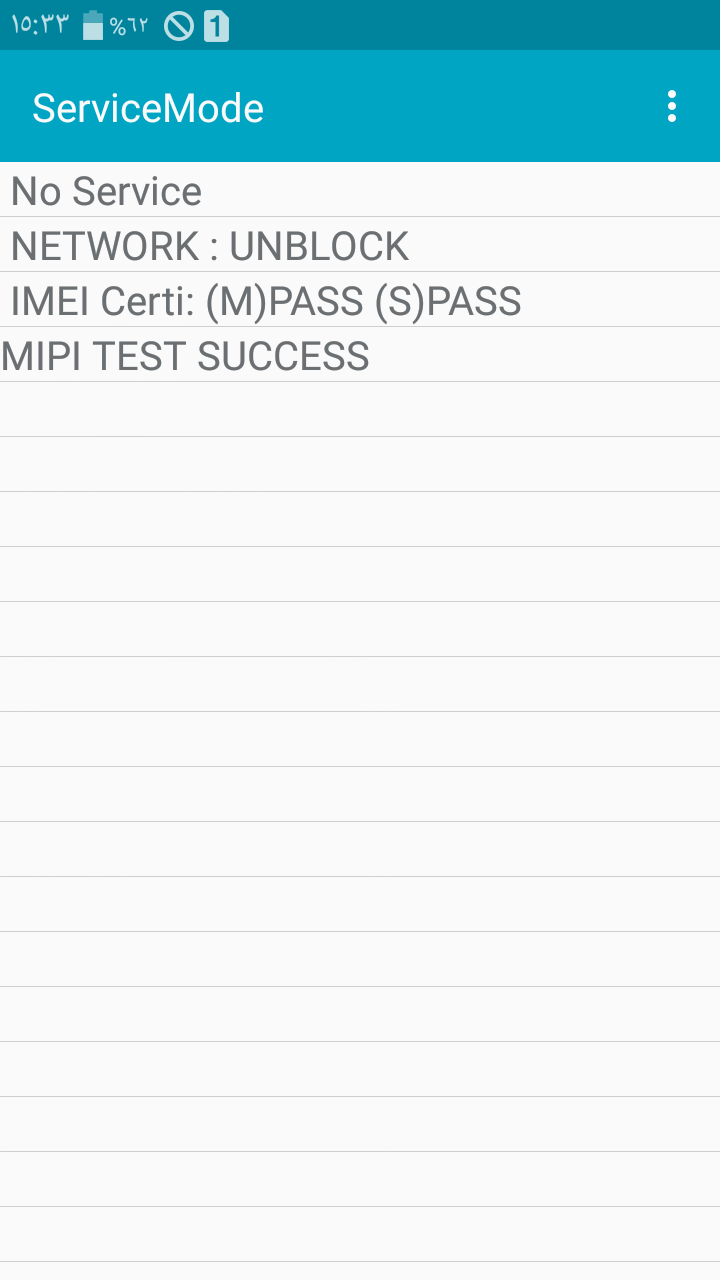
طيب افتح ايقونة الاتصال واكتب الكود ده #0011#*
وشوف اخر سطر فى قايمة البيانات هيكون ايه
ماجد جيفارا شَكر
 ضوابط المشاركة

 رد مع اقتباس


المفضلات